This article is about the Confirmation – Desktop Gamer PC event. It is now spring, and the confirmations are at the door. In addition, many confirmands are in the habit of investing in a stationary gamer PC. Here it is important to be aware that you get something that lasts and is actually suitable for gaming.
There are many players on the market who sell some half-finished solutions without thinking about what the concept should actually be able to do. In addition, it must also look a bit smart, since it is actually some wild games being played, and the PC must reflect the person using the computer.
On this occasion, we at Billige Koder offer to tailor our computers with self-selected cabinets for the confirmand. Therefore, simply write a message via our contact form or Facebook, and we will get back to you.
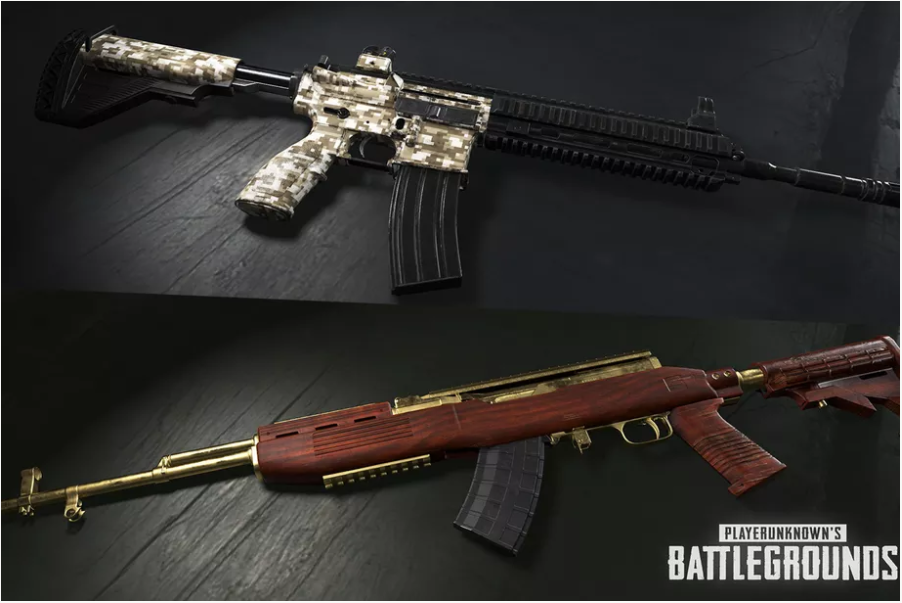
PUBG Skins are now coming, which is great news for many of the game's users on Steam. For some it is a welcome news, and for others it is primarily the gameplay that is interesting. At Billige Koder, we would like to find out what you think about the news.
The new PUBG skins, which were discovered by players earlier this month, can be unlocked via PUBG's latest 'loot crates', called 'Triumph Crates' and 'Raider Crates'. These boxes will only contain skins for weapons, and therefore not the same content as the previous boxes.
Prices for raiders, as well as triumph loot crates
The 'Raider boxes' will reportedly be free and will not require keys to unlock. 'Triumph boxes' can be unlocked using 'Weapon Cosmetic Keys', which are purchased via the Steam market. This also changes the drop chances for the previous boxes, as more is now added to the calculation. Some have tried to calculate these rates, which we at Billige Koder admire, but we still firmly believe in the RNG concept.
Welcome to this PlayerUnknown's Battlegrounds / PUBG FPS guide, which was written while I was camping out in the desert (with 1 kill on my conscience mind you). At the same time, I have been professional enough to avoid the red zone during the writing process. It is also December 24, so can also be seen as a small Christmas present. This Danish PUBG FPS guide is prepared because there are many who have problems with the game "stuttering" or "lagging" because their frames per seconds (FPS) is too low (2 sec I "lose" right back to the game when a vehicle comes).
The game is relatively demanding, and requires a lot in terms of GPU, RAM and CPU. Therefore, these aspects are only looked at to a lesser extent in relation to this Danish PUBG FPS guide. However, would recommend something like an Nvidia GTX 960M as a minimum to ensure around 60 FPS on low settings. For the higher settings, one can be recommended gaming PC with Nvidia GTX 1060. I myself have tested the following settings on a Lenovo Y700.
In relation to securing the best FPS in the game on the PC you now have, a number of sections are listed below. These sections each represent something that can be done to improve frames per second in PlayerUnknown's Battlegrounds (PUBG).
There are a number of elements that go into making PlayerUnknown's Battlegrounds run well. Windows 10 has a lot to say, especially for users with laptops. This is because there is a lot of junk software pre-installed on many laptops, as well as other elements that give a bad configuration to the game.
Just a fresh install of Windows with this update gave me 30 FPS on my Lenovo Y700 setup. Before I ran with a clean installation of Windows 10, but the Fall Creators Update must really have many improvements.
By installing the Windows 10 Fall Creators Update, it is possible to boost the FPS with a 960M by around 30 FPS if it is already low (around 30 FPS). I have tested this myself on a Lenovo Y700 gaming laptop PC. In the video below, I have prepared a video in Danish as far as I remember. This hopefully makes it a bit easier to install Windows 10 with a Danish guide. Feel free to leave a comment on something that worked.
Backup important files (photos, documents, videos)
Open the ISO file and transfer the files to a USB key using a program such as RUFUS if necessary
BOOT / start the Windows installation via the USB key and install the operating system on the correct partition on the hard drive
The necessary drivers, such as Nvidia drivers, are then installed. However, there is also a special procedure for this, which is detailed below:
PUBG FPS Guide – Nvidia Driver Installation
In connection with Nvidia driver installation for PUBG, you must first remove the driver completely from the registry. It is important that a complete "wipe" of the driver is carried out.
Fortunately, Guru3d has a tool for this which is linked here: Guru3d tool
It is recommended to start in "safe mode" in relation to this, but it is not necessary. After doing the full deletion of drivers, latest new driver can be installed.
Compared to graphics card overclocking, this can also provide a significant amount of additional FPS. However, you must be careful when using this method, as you may risk damaging the PC. If you use one of the following tools, make sure you have proper cooling. Use the cooling software that comes with the laptop. For example Lenovo Nerve Sense.
There are several different tools for overclocking your graphics card, including among others:
If you are using a laptop with a GTX 960M, the following settings are recommended:
60 GPU clock offset
700 memory clock offset
Keep an eye on the temperature. It is at your own risk.
In-game PlayerUnknown's Battlegrounds (PUBG) FPS guide for 60 FPS
Graphics settings from the game.
With a relatively low-end graphics card, my recommendation is to use the following settings on an Nvida GTX 960M:
Everything at very low
In addition to texture on high or ultra
View distance very low or medium
Anti-Aliasing on on medium with 1080p resolution and 80%-85% screenscale
Vsync on / enabled:
PUBG FPS Guide – Hard Drive Defragmentation
If the game is on a conventional hard drive, defragmenting the hard drive is recommended. This can be done with the tool Defrags. If you have an SSD, it is almost not worth defragmenting it, as SSDs are built in a different and much smarter way.
Several options that can potentially increase FPS without replacing the graphics card and CPU:
Special scrips and tweaks
Cleanup of PC software
SSD
CPU overclock
Fast 16 GB RAM – preferably 2133 MHz
Buy the game cheap and summary of this PUBG FPS guide
In summary, it is therefore a clean installation of the Windows 10 Fall Creator's update, as well as display drivers using Guru3d's tool, which potentially gives the most FPS. The game should also be run from an SSD for optimal loading of elements. The main points from this Danish PUBG FPS guide are listed below in point form:
Fresh Windows 10 with the latest update, remember to backup unique data Fall Creators Windows 10
Uninstall graphics drivers and download latest ones, – Guru3d tool
Use the proper cooling software that comes with the laptop. For example: Lenovo Nerve Sense. Remember to use a headset, as cooling is often noisy.
Defragment hard drive if it is a conventional hard drive – Defrags
By the way, didn't end up sitting in-game during the entire writing process anyway. Hope this Danish PUBG FPS guide was useful and if there are any questions, there is one contact form. Everyone is also welcome to follow billige-koder.dk on Facebook. We also build PCs tailored to your needs. Take a look if necessary Ryzen 1200 gaming PC. Buy the game here: Buy PlayerUnknown's Battlegrounds (PUBG) at a cheap price.
The picture is fan-made, made from the official launch trailer!
Age of Empires IV (4) has just been announced a short time ago with a preview of the game's artwork. There is therefore no gameplay to see yet. Who would have expected that we would see a fourth in the series of one of the most defining games for the RTS genre in 2017. When we will get to see gameplay remains to be seen. Likewise, it is unknown when we will be told the release date in relation to Age of Empires IV (4). Whether it will be 2017 or 2018 is therefore very much unknown. However, do not despair and read on!
The previous editions of the game were some of the best of its time, and therefore the 4 may also be a bestseller. This both within RTS, gameplay, production, but also history. Therefore, the target group is also large, which gives the game an extremely good potential.
Age of Empires IV (4) cd key at Cheap Codes?
At Cheap Codes you can find the game when it is released, and also find all the old versions, as well as their remasered versions. Just use the following link to find our Age of Empires category and the prices of the different games: Buy CD key Age of Empires.
Since the game is just announced, it will most likely be a few months before we know more about a release date. Until then, it is possible to play the old classics in their classic or remastered versions. This is clearly something we recommend at Billige Koder, as the games were some of the first to define the RTS genre.
Are you moving from your current apartment to a new home? Would you like to save on the renovation of both tenancies? Then Vvlytningsgaranti has the solution for you.
With the Moving Guarantee, you can get up to 10% discount on the renovation of both your current apartment and the new home you are moving into. We take care of all the hard work of renovating both properties, so you can focus on enjoying your new housing.
All you have to do is say that you have two homes that need to be renovated, then you will be able to get the discount.
Our experienced team of renovators will make sure everything is done professionally and on time. We take care of everything from painting, floor sanding, cleaning and of course the normal renovation of both tenancies. You can be sure that you will get a perfectly renovated apartment when you move into your new home, and that you will get all your deposits back when you move from your current apartment.
Hear more from our guest on the blog - contact them today
So why wait? Get maximum savings on your refurbishment with a Move Out Guarantee today! We look forward to helping you with a problem-free moving statement.